Autel MaxiIM IM508 Key Programmer Reviews in 2020

Autel MaxiIM IM508 Key Programmer can add new keys, programming key when all keys lost, can read pin code, add remote worked, etc.
 

Here are the real reviews from Credit to FB Group Autel MaxiIM IM608 & IM508 OBDII Success Members. (Big thanks!!!)


Fiesta 2018 add Smart key

Took car under menu 2018-

Read flash, dash off for about 2mins (don’t panic), then Reading.

Added used key Hitag pro Id49.

Used tool im508 with connected to WiFi and xp400.

But learning new key was in the middle console. XP400 not needed.


Autel MaxiIM IM508 Key Programmer Reviews  1

Peugeot 207

read pin successful

Coded car successful (in 2 seconds)

Remote didn’t work

Autel MaxiIM IM508 Key Programmer Reviews  2

Peugeot 207 2007

Pin Read success

Add key success.

Used aftermarket remote CE0536 ASK.

Autel MaxiIM IM508 Key Programmer Reviews  3

W211 2005

Autel Im508 +xp400

Xhorse BE key programming via IR.

Only obd job – You need to follow instructions.

Whole process took about 30min – it was my 1st MB. Calculation about 18mins. Without gbox.

Warning – after programming new key original key stopped working. Remote worked, but cannot turn on ignition. I needed to left it in ignition and wait few minute, then I heard ESL motor and car started.

Autel MaxiIM IM508 Key Programmer Reviews   3

Toyota Yaris HV – Add Key – 5 min done with IM508

Autel MaxiIM IM508 Key Programmer Reviews  4

Ford Transit 2020 virtually new 300 miles

Add a remote key id47/49

Internet connection needed

Battery support pack

Tried to add key with new un programmed key, failed security each time.

Tried using working key, IM100 (same as IM508) then read the flash, took about 3 minutes, then ignition off, insert new key to add, programmed perfectly.

MB W246 2013 add key success. IM508+xp400.

Autel MaxiIM IM508 Key Programmer Reviews  5

Opel mokka 2016

Pin Read

Add key – not ok, car didn’t accepted new key.

I made AKL procedure and both Keys were learned.

Safety time ca. 10min, Then procedure open and close driver door and turn off turn on ignition.

Key tool max and kdx2 clone this id46 ok but car doesn’t start. That’s Why I used im508 to program this key.

Autel MaxiIM IM508 Key Programmer Reviews  6

Megane 2013

Read D Flash by obd. Im508 without programmer.

Program blank card pcf7941

4minutes work.

I programmed blank card without using existing card, So it can do AKL too.

Internet connection required.

Autel MaxiIM IM508 Key Programmer Reviews  7

Q5 2012 BCM2 315mhz

Im508 + xp400.

Make dealer key and add key by obd.

First attempt failed – I didn’t connect autel to internet and autel asked me about de-energize bcm2. I didn’t unplug bcm2 during programming and it was dead after trying Read eeprom data. I had to Read bcm2 on bench and repair dflash file.

Second attempt after fixing bcm2 success without any problem.

Autel connected to internet, I need to remember that

Autel MaxiIM IM508 Key Programmer Reviews  8

Audi A6 2007. OBD success.

Read immo data,get pin and CS. Made dealer key and and add key.

Used autel IM508 and XP400-PRO. Internet connection needed. Aftermarket key used, remote work instantly.

Autel MaxiIM IM508 Key Programmer Reviews  9
Autel MaxiIM IM508 Key Programmer Reviews  10
Autel MaxiIM IM508 Key Programmer Reviews  11

MB SL 2003 key added, im508 + xp400, OBD.

Autel MaxiIM IM508 Key Programmer Reviews  12

2017 Tiguan R line…add mqb remote key im508 with xp200winner..and so easy!

Autel MaxiIM IM508 Key Programmer Reviews  13

IM508 Range Rover Sport 2006, add 2 keys in 5min

Autel MaxiIM IM508 Key Programmer Reviews  14

Im508 2013 Smartfor2 add key success

2015 VW GOLF AKL SUCCESS , IM508 + XP400 , AROUND 15 MINS FOR ONLINE CALCULATION ($30) AFTERMARKET REMOTE USED .

Autel MaxiIM IM508 Key Programmer Reviews  15

Megane III RS 2011

Pcf7952 Add key

Im508 few minutes, job done via OBD.

Autel MaxiIM IM508 Key Programmer Reviews  15

Peugeot 308 2018 key added. IM508

Autel MaxiIM IM508 Key Programmer Reviews  16

2010 Mercedes sprinter

Add 2nd

Less than 5mins .for password calculation

Using im508 and xp400

Used aftermarket key

Mercedes W210 AKL success 20 min. password – IM508 & Gbox2 & HP-400 pro

Autel MaxiIM IM508 Key Programmer Reviews  17
Autel MaxiIM IM508 Key Programmer Reviews  18

Fiat Grand Punto 2007 , Read immo data , make dealer key and programme key … all ok . Im508 + xp200.

Autel MaxiIM IM508 Key Programmer Reviews  19

Success add key by OBD Mercedes C Class 2001 W203 with IM508 + XP400 pro + key simulator. Password 4 min. Aftermarket key.

Autel IM508 2017 TOYOTA PROACE

READ PIN SUCCESS

ADD KEY SUCCESS

Used an xhorse remote , went in under Peugeot expert.

Autel MaxiIM IM508 Key Programmer Reviews  20
Autel MaxiIM IM508 Key Programmer Reviews  21

tool: im508 + xp400

all via obd

upgraded cas3

made dealer key

learned key

used power supply 14V 50A

used personal cellphone as hotspot 4g

success!

VW Transporter 2010, AKL, OBD, im508 and XP400. Paid $10 to Autel.

Autel MaxiIM IM508 Key Programmer Reviews  22

MB SPRINTER 2008 key added. Password in 15 min. OBD + IM508 + XP400

Autel Im508

Vauxhall astra 2008 vxr

Read pin yes

Programed keyless start key yes

Added second key

But will delete all key then you re add

God job money in the bank

Land Rover Freelander2 , 2011, success

Autel Im508

Autel MaxiIM IM508 Key Programmer Reviews  23

Ford Ranger 2017 key added. IM508, OBD

Autel MaxiIM IM508 Key Programmer Reviews  24

Dacia duster 2011 4×4

add key immo chip PCF7946AT

IM508 OBD

Autel MaxiIM IM508 Key Programmer Reviews  25

MB VITO 2014 key added. Password in 28 min. OBD + IM508 + XP400.

Autel MaxiIM IM508 Key Programmer Reviews  26

CITROEN C3 EU 2016

IM508 OBD

PIN+ADD KEY

Mitsubishi Outlander PHEV 2014 add key success! Im508

Im508 on 2010 mini

Add 2nd key CAS 3

Vauxhall Insignia 2014, key added, im508, OBD, need to wait 12min.

Autel Im508 2018 Vauxhall/Opel Vivaro add key success , went under Renault Trafic took around 25 minutes.

Updating…

https://www.videntstore.com/

Autel XP400 PRO Key Programmer User Manual

Hey guys, let’s start a new topic: How to use Autel XP400 PRO with Autel’s IMMO & Key programming tablet (Autel IM508IM608, IM608 Pro etc), with Autel XP400 PRO connected, Autel tablet will have powerful functions including. advanced key programming vehicle coverage, powerful IMMO Functions, advanced Programming function, Read EEPROM and MCU, Read/Write odometer, and more.

Autel XP400 PRO Quick Reference Guide:

  1. USB Port – provides data communication and 5V DC power supply.
  1. DC Port – provides 12V DC power supply.
  1. DB 26-Pin Port — connects with the Mercedes Benz infrared collector, ECU cable, MCU cable and MC9S12 cable.
  1. Cross Signal Pins – hold the MCU spare cable or DIY signal interface.
  1. Vehicle Key Slot – holds the vehicle key.
  1. Transponder Slot – holds the transponder.
  1. Mercedes Infrared Key Slot – holds the Mercedes infrared key.
  1. Status LED – indicates the current operating status.
  1. EEPROM Component Transponder Slot – holds the EEPROM plug-in transponder or EEPROM socket.

USB Port

The Type B USB port provides data communication and power supply for handheld device, PC and XP400 Pro.

DC Port

DC Port is used to provide 12 V power supply for the XP400 Pro.

DB 26-Pin Port

Four components can be connected to this port: Mercedes Infrared Collector, ECU Cable, MCU Cable and
MC9S12 Cable.

Autel XP400 PRO Quick Reference Guide

Important:

Before operating or maintaining this unit, please read these instructions carefully. Pay extra attention to the safety warning and precautions. Use this unit correctly and properly. Failure to do so may cause damage and/or personal injury and will void the production warranty.

  1. Insert the USB port into XP400 Pro. Ensure the proper connection.
  1. Connect the other port of the USB cable with Autel’s IMMO & Key programming tablet (for example: Autel IM508, IM608, IM608 Pro etc) or PC which has installed the PC programmer. Ensure the proper communication.
  1. Activate Autel’s IMMO & Key Programming Tablet or the software from PC. Make sure the display tablet has sufficient battery or the software from the PC has been updated to the latest version.
  1. Connect Autel’s IMMO & Key Programming Tablet (the software from PC) with XP400 Pro by USB cable.

* After the connection of IMMO & Key Programming Tablet with XP400 Pro, the LED

indicator from XP400 Pro will display green light, indicating the readiness of XP400 Pro.

Autel XP400 PRO Quick Reference Guide

Autel XP400 PRO Package list

Autel XP400 PRO Package

1pc x XP400 Pro Main Unite

1pc x APB129 – EEPROM Adapter

1pc x APA002 – EEPROM Socket

1pc x APB125 – Mercedes Infrared Collector

1pc x APB103 – MCU_PLCC52 Adapter

1pc x APB104 – MCU_FQFP64 Adapter

1pc x APB105 – MCU_FQFP80 Adapter

1pc x APB106 – MCU_FQFP112 Adapter

1pc x APB107 – MCU_FQFP144 Adapter

1pc x APB108 – MCU_FQFP176 Adapter

1pc x APB109 – MCU_FQFP32 Adapter

1pc x APB110 – MCU_FQFP48 Adapter

1pc x APB111 – MCU_SO28 Adapter

1pc x APA101 – Spare Signal Cable

1pc x APC101 – USB Cable (Standard USB –Type B USB)

1pc x APA103 – EEPROM Clamp

1pc x APA107 – ECU Cable

1pc x APA108 – MCU Cable

1pc x APA109 – MC9S12 Cable

1pc x Dupont Line

Why Autel XP400 PRO is powerful than Autel XP400? please look at their comparison:

Autel XP400 PRO vs. Autel XP400
 

FeaturesX400 ProXP400
Image
Read/write EEPROM445 different chip types newly added support (AM29FXXX series, MB29FXXX series)330 chip types
Read/ write MCU2067 chip types1541 chip types
Read/write Engine ECU41 chip types add write support for
SIMTEC76(AM29F800BB).WRITE
40 chip types
read/ write Immoblizer ECU181 chip types168 chip types
Read/write odometerread odometer module 171 types (update in July)read odometer module 9 types
Airbag read/
write
read airbag module 5 typesread airbag module 5 types
Frequency detection315/ 433/ 868MHz315/ 433/ 868MHz
read/ write KeySupportSupport
Unlock keysupport 11 key types (Audi/ BMW)N/A
Write key via
dump
Mitsubishi, Suzuki, fiat, landrover, JaguarMitsubishi, Suzuki, fiat landrover. Jaguar
Easy to use/
stability
I.Stability of key read/ write, chip read/ write, IR key read/
write are greately enchanced.
2. menus are too vague and can’t select intuitively
3. with high-definiton wiring diagrams (not sufficiently
covered)
1. menus are too value and can’t select
intuitively
2. with high-definiton wiring diagrams
(not sufficiently covered)

The above information is not detailed enough? Please read detailes here:

https://www.obdii365.com/wholesale/autel-xp400-pro-key-and-chip-programmer.html

BTW, If you are interested in im608 pro, contact us  to get the best price

Whatsapp/BOTIM: +86 18259252285
Email: Sales@OBDII365.com
Skype: OBDII365.com

Autel MaxiIM IM608 key programming for BMW CAS4 CAS4+ by OBD

Autel MaxiIM IM608 is able to program the key for BMW CAS4 CAS4 + via OBD and does not need to dismantle the ECU box
Important tips: Network connection is required during operation.

Autel IM608 BMW CAS4 CAS4+ key programming via OBD

BMW F30 key programming for example:

Notes: For CAS4, Add key all key lost procedure is the same, no need to get ISN; For Cas4+ all key lost, go to ISN code management to try to read Engine ISN code first, if it is not supported, you need to get ISN code through other way.

– The other steps are as the same as add key. To check the type of CAS system, go to “ECU information” to check.

Procedure:

Plug Autel IM608 into the OBD2 port of BMW, tap “BMW”.

Autel IM608 BMW CAS4 CAS4+ key programming via OBD

Smart selection.

Autel IM608 BMW CAS4 CAS4+ key programming via OBD 3

Mini(Europe)->smart mode

Autel IM608 BMW CAS4 CAS4+ key programming via OBD 3

Key learning -> OK (to confirm vehicle information) -> OBD learning -> OK (after reading a few instructions here)

Autel IM608 BMW CAS4 CAS4+ key programming via OBD 5
Autel IM608 BMW CAS4 CAS4+ key programming via OBD 6
Autel IM608 BMW CAS4 CAS4+ key programming via OBD 7

OBD Read SK

Read notes.

Autel IM608 BMW CAS4 CAS4+ key programming via OBD 8
Autel IM608 BMW CAS4 CAS4+ key programming via OBD 9

Do you have a working key? Yes or No.l

Autel IM608 BMW CAS4 CAS4+ key programming via OBD 9

Please put a working key to start coil as close as possible.

Autel IM608 BMW CAS4 CAS4+ key programming via OBD 10

It will read the password successfully.

Select a blank key position to write key.

Autel IM608 BMW CAS4 CAS4+ key programming via OBD 11

Please put new key close to start coil. Key frequency: 868MHZ.

Key learning has two steps…

Autel IM608 BMW CAS4 CAS4+ key programming via OBD 12

Write key successfully.

Autel IM608 BMW CAS4 CAS4+ key programming via OBD 13

So follow the instructions on Autel IM608, the whole process will be done easily!

Source:http://blog.obdii365.com/2020/09/10/autel-im608-bmw-cas4-cas4-key-programming-via-obd/

Will Lonsdor K518S Program Mitsubishi Smart key when AKL

Lonsdor K518 is tested able to program Mitsubishi smart key when all keys lost, incl. Triton /2017-/, Xpander/2018-/, Pajero Sport /2017-, Mirage / 2014-.

MITSUBISHI\Generate LKE for all key lost:

Function

  1. Generate LKE for all key lost:generate a LKE which can turn on dashboard to add keys.

Operation

Generate LKE for all key lost

This function needs to dismantle car IMMO and PEPS, use programmer to read EEPROM chip data(24C16/24C01/25C320 chip supported currently), and copy and save it to customfile folder in K518 memory, then load the EEPROM data to generate key emulator(LKE, similar to working key).

When all keys are lost, this function can generate a spare master key, then you can use this key to turn on dashboard to add other keys.

Please place a key emulator(LKE) into K518 card slot.

Generating…

Completed. PIN code: 0A11. Please put a spare key close to ignition switch, turn on dashboard, and enter [add key] menu to program new keys.

Attention

This function needs to dismantle car IMMO and PEPS, use programmer to read EEPROM chip data(24C16/24C01/25C320 chip supported currently), and copy and save it to customfile folder in K518s key programmer memory, than load the EEPROM data to generate key emulator(similar to working key).

When EEPROM chip type are 24C16, 24C01 or 25C320, this function supports all key lost programming.

To be upgrading…

www.obdii365.com

XTOOL X100 Pro2 Update Error & Solution

 Recently, some customers gave feedbacks that they failed to update Xtool X100 Pro2 auto key programmer. Here have collected the common update error and offered the corresponding solution.

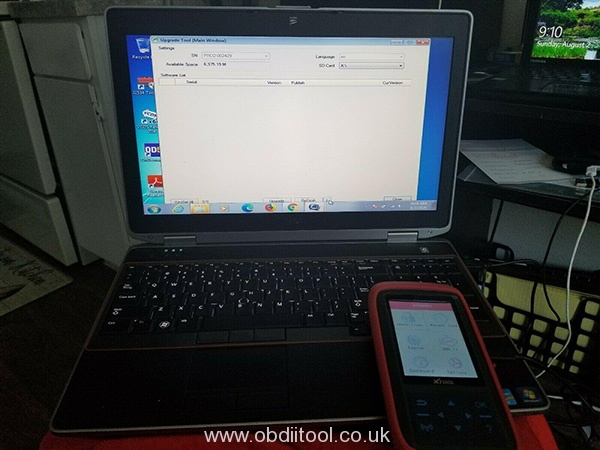
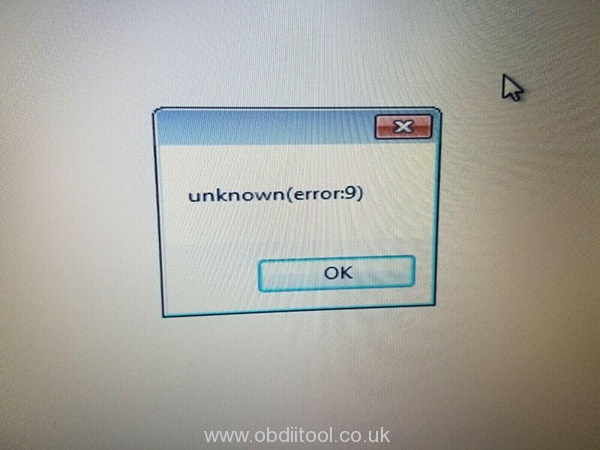
Problem 1: I install the x100 pro2 upgrade tool from xtooltech.com, but it cannot identify the device. The error message is “unknown (error: 9)”. I change another computer to install, but also fails.

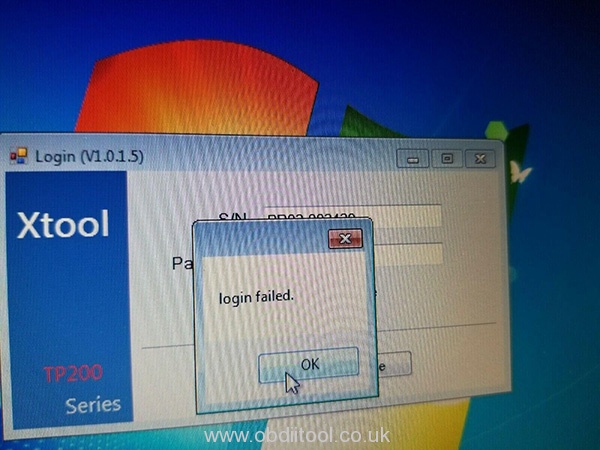
Problem 2: When I input the S/N and password from the Certificate of Quality paper, it prompts “login failed”.

Problem 3: After I update x100 pro 2upgrade tool, my device cannot use, it appears white screen with only red bar at the top of the screen. I check the main menu, everything is ok, but when connecting it to the car, it cannot do anything.

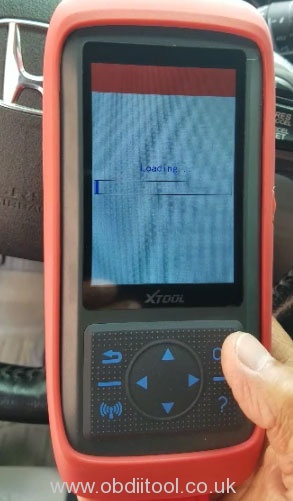
Problem 4: I had updated the software from V3.0 to V4.0. When I connected it to the car, it showed “Loading”, but then the screen turned blank and couldn’t work (IMMO, OBD2, Dash Board, Eeprom etc).

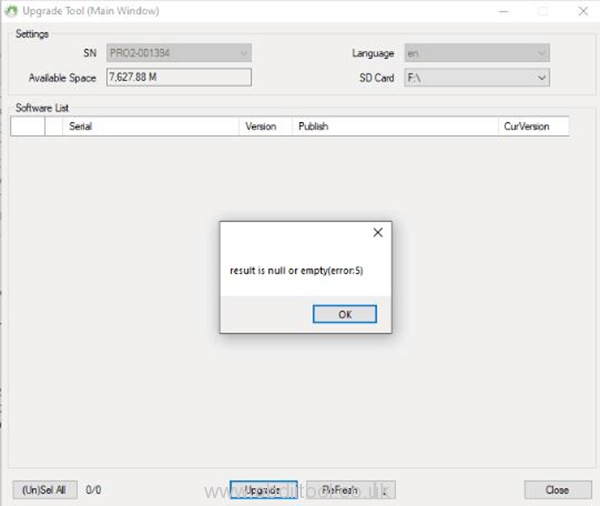
Problem 5: It prompts an error message “Result is null or empty” when update x100 pro2.

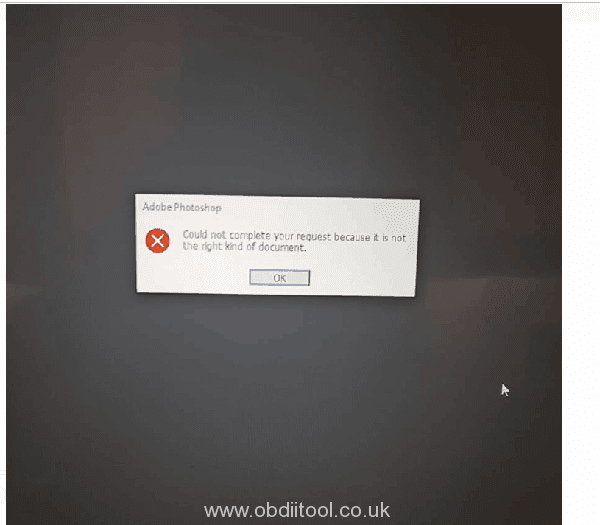
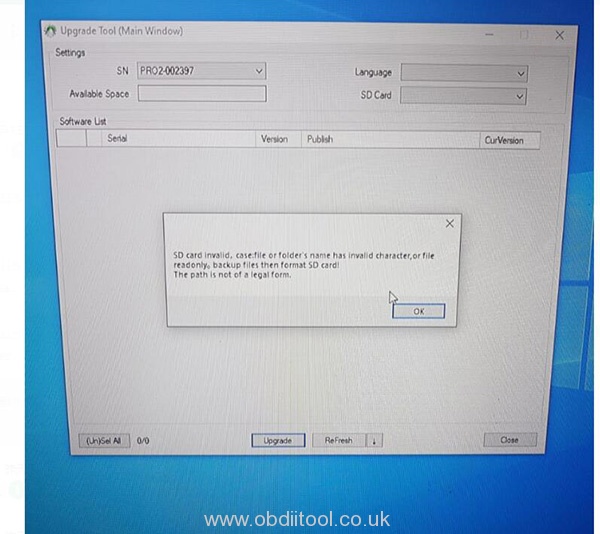
Problem 6: When I update x100 pro2, it prompts “Could not complete your request because it is not the right kind of document” and “SD card invalid. Case: file or folder’s name has invalid character, or file read only. Backup files then format SD card! The path is not of a legal form.”

The possible causes for the errors above including:

1.You use an incorrect upgrade tool

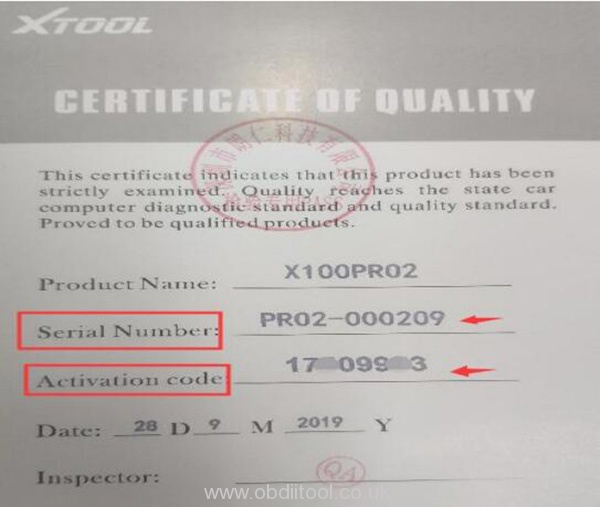
2.The serial number begins with PRO, but the letter “O” you input is number “0”

The solution:

1.If you cannot update via USB cable, change to SD connection.

You should format the TF card before re-upgrading. Remove the SD card from x100 pro2 key programmer, and insert into card reader, then connect to computer.

2.Use the correct upgrade tool

The step-by-step guide to update x100 pro2 key programmer:

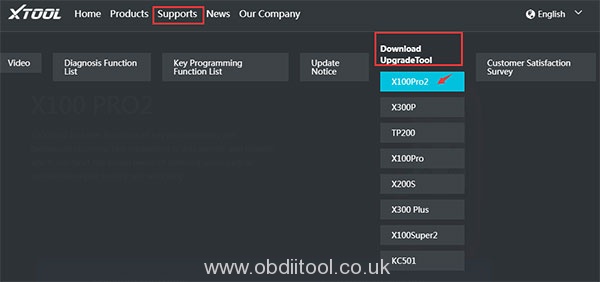
Step 1: Visit the official website http://www.xtooltech.com

Step 2: Select Supports-> Download Upgrade tool-> X100 Pro2

It will start to download TP200Installer automatically

Step 3: Extract the installation package into an upgrade tool

Step 4: Connect X100 PRO2 to Windows computer with Type-c cable;

Note: If the USB device cannot be recognized. Please solve it by the following method:

1.Insert the TYPE-C connector halfway to make the screen light up

2. Then insert all of the TYPE-C connector to identify the USB device

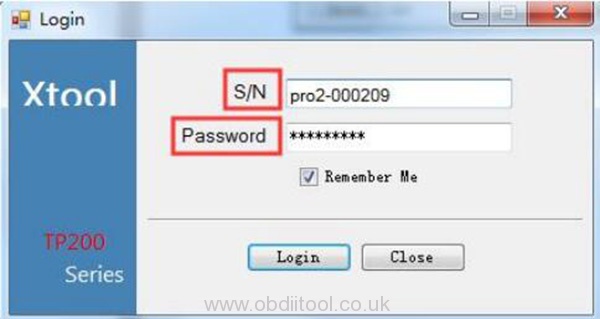
Step 5: Open the upgrade tool

Input the Product SN and Password and click login

(Get the Serial number and activation code from Certificate of Quality paper)

Note: The serial number begins with the three letters- PRO

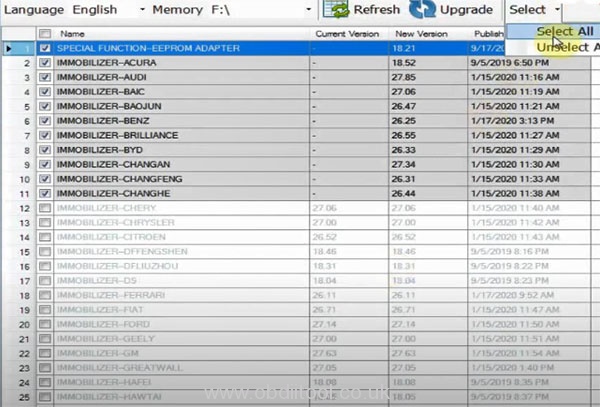
Step 6: Select all upgrade options and the language you desire

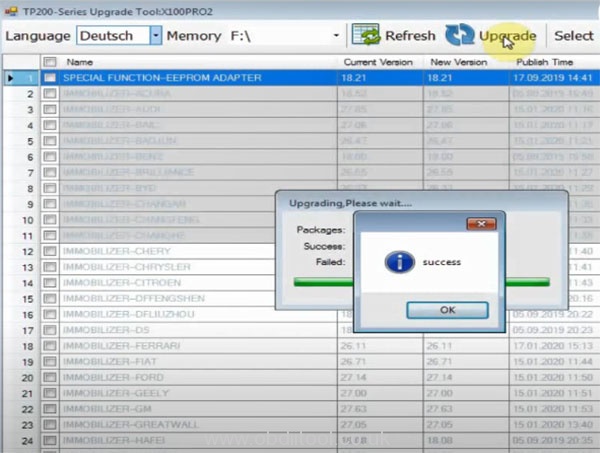
Click on “Upgrade”

When the upgrade process is completed, it will prompt “success”

Xtool X100 Pro2 update video:https://youtu.be/GE8cBaaXm_g

Tech support by:
http://blog.obdiitool.co.uk/xtool-x100-pro2-update-error-solution/

VVDI PROG V4.9.1 Bosch ECU Adapter Full List

Offer the latest Xhorse VVDI Prog V4.9.1 update info and Bosch ECU Adapter full list.

Vvdi Prog V4.9.1 Bosch Ecu Adapter Full List

1.VVDI Prog V4.9.1 Update on Feb. 19th, 2020

1).Firmware Version: 2.1.0, Software Version: V4.9.1

2).Free download link:https://mega.nz/#!ERt1DCrK!EnIbrixDeXcCI8_o1XvMrQ7ZZPOC5WATz9aNvRHiDOg

Password: 123456

3).V4.9.1 VVDI prog added more adapter options in Bosch ECU Adapter for AUDI, ALFA-ROMEO, ASTON-MARTIN, BENZ, BMW, BUGATTI-VEYRON, CHRYSLER, CITROEN, DACIA-LOGAN, FORD, HONDA, HYUMDAI, ISUZU, JAGUAR, JEEP, KIA, LANDROVER, MASERATI, MCLAREN, VOLKSWAGEN and SKODA.

Note: This version don’t need update firmware
+ Add VVDI PROG USER MUNUAL 4.9.1 version in Doc folder

+ Add ME17.3.0(ADAPTER) options in <10-BOSH-ECU-ADAPTER>-><ABARTH>

+ Add MED17.1.10(ADAPTER) options in <10-BOSH-ECU-ADAPTER>-><AUDI>
+ Add EDC17CP54(ADAPTER) options in <10-BOSH-ECU-ADAPTER>-><AUDI>

+ Add EDC17C69(ADAPTER) options in <10-BOSH-ECU-ADAPTER>-><ALFA-ROMEO>
+ Add MED17.3.3(ADAPTER) options in <10-BOSH-ECU-ADAPTER>-><ALFA-ROMEO>

+ Add ME17.8.31(ADAPTER) options in <10-BOSH-ECU-ADAPTER>->
<ASTON-MARTIN>
+ Add MED17.7.5(ADAPTER) options in <10-BOSH-ECU-ADAPTER>->
<ASTON-MARTIN>

+ Add MED17.7.7(ADAPTER) options in <10-BOSH-ECU-ADAPTER>-><BENZ>  + Add MED17.7.5(ADAPTER) options in <10-BOSH-ECU-ADAPTER>-><BENZ>
+ Add ME17.8.3.3(ADAPTER) options in <10-BOSH-ECU-ADAPTER>-><BENZ>

+ Add EDC17CP49(ADAPTER) options in <10-BOSH-ECU-ADAPTER>-><BMW>
+ Add EDC17C76(ADAPTER) options in <10-BOSH-ECU-ADAPTER>-><BMW>
+ Add MED17.1.12(ADAPTER) options in  <10-BOSH-ECU-ADAPTER>->
<BUGATTI-VEYRON>

+ Add EDC17C79(ADAPTER) options in <10-BOSH-ECU-ADAPTER>-><CHRYSLER>

+ Add EDC17CP52(ADAPTER) options in <10-BOSH-ECU-ADAPTER>-><CITROEN>

+ Add ME1717.9.20(ADAPTER) options in <10-BOSH-ECU-ADAPTER>-><DACIA-LOGAN>

+ Add EDC17C70(ADAPTER) options in <10-BOSH-ECU-ADAPTER>-><FORD>
+ Add EDC17CP42(ADAPTER) options in <10-BOSH-ECU-ADAPTER>-><FORD>
+ Add EDC17C58(ADAPTER) options in <10-BOSH-ECU-ADAPTER>-><HONDA>
+ Add ME17.9.21(ADAPTER) options in <10-BOSH-ECU-ADAPTER>-><HYUMDAI>
+ Add EDC17C83(ADAPTER) options in <10-BOSH-ECU-ADAPTER>-><ISUZU>
+ Add MED17.9.9(ADAPTER) options in <10-BOSH-ECU-ADAPTER>-><JAGUAR>
+ Add MED17.8.32(ADAPTER) options in <10-BOSH-ECU-ADAPTER>-><JAGUAR>
+ Add EDC17C79(ADAPTER) options in <10-BOSH-ECU-ADAPTER>-><JEEP>
+ Add ME17.9.21(ADAPTER) options in <10-BOSH-ECU-ADAPTER>-><KIA>
+ Add MED17.8.32(ADAPTER) options in <10-BOSH-ECU-ADAPTER>-><LANDROVER>
+ Add EDC17C79(ADAPTER) options in <10-BOSH-ECU-ADAPTER>-><MASERATI>
+ Add MED17.3.4(ADAPTER) options in <10-BOSH-ECU-ADAPTER>-><MASERATI>
+ Add ME17.8.3.3(ADAPTER) options in <10-BOSH-ECU-ADAPTER>-><MCLAREN>
+ Add MED17.1.27(ADAPTER) options in <10-BOSH-ECU-ADAPTER>-><VOLKSWAGEN >
+ Add ME17.5.24(ADAPTER) options in <10-BOSH-ECU-ADAPTER>-><SKODA>
+ Add ME17.5.26(ADAPTER) options in <10-BOSH-ECU-ADAPTER>-><SKODA>

2.Xhorse VVDI PROG V4.9.1 BOSCH ECU Adapter Full List:

MFRSTYPEREMARK
ABARTHME17.3.0(ADAPTER)Need  BOSH-ECU  Adapter
AUDIMED17.1.62(ADAPTER)Need  BOSH-ECU  Adapter
MED17.1.10(ADAPTER)Need  BOSH-ECU  Adapter
EDC17CP54(ADAPTER)Need  BOSH-ECU  Adapter
ALFA-ROMEOEDC17C69(ADAPTER)Need  BOSH-ECU  Adapter
MED17.3.3(ADAPTER)Need  BOSH-ECU  Adapter
ASTON-MARTINMED17.7.5(ADAPTER)Need  BOSH-ECU  Adapter
ME17.8.31(ADAPTER)Need  BOSH-ECU  Adapter
BENZEDC17CP57(ADAPTER)Need  BOSH-ECU  Adapter
ME17.8.32(ADAPTER)Need  BOSH-ECU  Adapter
MED17.7.3.1(ADAPTER)Need  BOSH-ECU  Adapter
MED17.7.1(ADAPTER)Need  BOSH-ECU  Adapter
MED17.7.3(ADAPTER)Need  BOSH-ECU  Adapter
EDC17C66(ADAPTER)Need  BOSH-ECU  Adapter
MED17.7.7(ADAPTER)Need  BOSH-ECU  Adapter
MED17.7.5(ADAPTER)Need  BOSH-ECU  Adapter
ME17.8.3.3(ADAPTER)Need  BOSH-ECU  Adapter
BMWME17.5.22(TC1724) (ADAPTER)Need  BOSH-ECU  Adapter
MEVD17.2.4_Exx(N20)(ADAPTER),Need  BOSH-ECU  Adapter
MEVD17.2.4_Exx(N20)(ADAPTER)Need  BOSH-ECU  Adapter
MEVD17.2.4_Fxx(N20)(ADAPTER)Need  BOSH-ECU  Adapter
MEVD17.2.9_Fxx(N20)(ADAPTER)Need  BOSH-ECU  Adapter
MEVD17.2.9_Exx(N20)(ADAPTER)Need  BOSH-ECU  Adapter
MED17.5.25(TC1782)(ADAPTER)Need  BOSH-ECU  Adapter
MED17_5_22(TC1782)(ADAPTER)Need  BOSH-ECU  Adapter
MEVD17_2_3(B38)(ADAPTER)Need  BOSH-ECU  Adapter
MEVD17_2_K(B38)(ADAPTER)Need  BOSH-ECU  Adapter
MEVD17.2.5(ADAPTER)Need  BOSH-ECU  Adapter
MEVD17.2.8(ADAPTER)Need  BOSH-ECU  Adapter
MEVD17.2.H(ADAPTER)Need  BOSH-ECU  Adapter
MEVD17.2.P_Fxx(N20)(ADAPTER)Need  BOSH-ECU  Adapter
MEVD17.2_Fxx(N55)(ADAPTER)Need  BOSH-ECU  Adapter
MEVD17.2.G(N55)(ADAPTER)Need  BOSH-ECU  Adapter
MEVD17.2.6(N55)(ADAPTER)Need  BOSH-ECU  Adapter
EDC17CP49(ADAPTER)Need  BOSH-ECU  Adapter
EDC17C76(ADAPTER)Need  BOSH-ECU  Adapter
CHRYSLEREDC17C79(ADAPTER)Need  BOSH-ECU  Adapter
CITROENEDC17CP52(ADAPTER)Need  BOSH-ECU  Adapter
DACIA-LOGANME1717.9.20(ADAPTER)Need  BOSH-ECU  Adapter
BUGATTI-VEYRONMED17.1.12(ADAPTER)Need  BOSH-ECU  Adapter
FORDEDC17C10(ADAPTER)Need  BOSH-ECU  Adapter
EDC17C70(ADAPTER)Need  BOSH-ECU  Adapter
EDC17CP42(ADAPTER)Need  BOSH-ECU  Adapter
GMEDC17CP47(ADAPTER)Need  BOSH-ECU  Adapter
HYUNDAIME17.9.21.1(ADAPTER)Need  BOSH-ECU  Adapter
EDC17CP62(ADAPTER)Need  BOSH-ECU  Adapter
EDC17C57(ADAPTER)Need  BOSH-ECU  Adapter
ME17.9.21(ADAPTER)Need  BOSH-ECU  Adapter
HONDAEDC17C58(ADAPTER)Need  BOSH-ECU  Adapter
JAGUAREDC17CP55(ADAPTER)Need  BOSH-ECU  Adapter
MED17.9(ADAPTER)Need  BOSH-ECU  Adapter
MED17.9.9(ADAPTER)Need  BOSH-ECU  Adapter
MED17.8.32(ADAPTER)Need  BOSH-ECU  Adapter
JEEPEDC17C79(ADAPTER)Need  BOSH-ECU  Adapter
KIAME17.9.21.1(ADAPTER)Need  BOSH-ECU  Adapter
ME17.9.21(ADAPTER)Need  BOSH-ECU  Adapter
PEUGEOTEDC17C60(ADAPTER)Need  BOSH-ECU  Adapter
EDC17CP42(ADAPTER)Need  BOSH-ECU  Adapter
MED17.4.4(ADAPTER)Need  BOSH-ECU  Adapter
VOLKSWAGENME17.5.22(ADAPTER)Need  BOSH-ECU  Adapter
MED17_5_25(ADAPTER)Need  BOSH-ECU  Adapter
ME17.9.52(ADAPTER)Need  BOSH-ECU  Adapter
EDC17C54(ADAPTER),Need  BOSH-ECU  Adapter
EDC17C74(ADAPTER),Need  BOSH-ECU  Adapter
EDC17CP44(ADAPTER),Need  BOSH-ECU  Adapter
ME17.1.1(ADAPTER),Need  BOSH-ECU  Adapter
MED17.1.1(ADAPTER),Need  BOSH-ECU  Adapter
MED17.1.6(ADAPTER),Need  BOSH-ECU  Adapter
MED17.1.21(ADAPTER),Need  BOSH-ECU  Adapter
MED17.1.61(ADAPTER),Need  BOSH-ECU  Adapter
MED17.5.21(ADAPTER)Need  BOSH-ECU  Adapter
EDC17C60(ADAPTER)Need  BOSH-ECU  Adapter
MED17.1.27(ADAPTER)Need  BOSH-ECU  Adapter
TOYOTATOYOTA_ME17.9.52(ADAPTER)Need  BOSH-ECU  Adapter
VOLVOEDC17CP48(ADAPTER)Need  BOSH-ECU  Adapter
EDC17CP68(ADAPTER)Need  BOSH-ECU  Adapter
LANDROVERMED17.8.32(ADAPTER)Need  BOSH-ECU  Adapter
MASERATIEDC17C79(ADAPTER)Need  BOSH-ECU  Adapter
MED17.3.4(ADAPTER)Need  BOSH-ECU  Adapter
MCLARENME17.8.3.3(ADAPTER)Need  BOSH-ECU  Adapter
SUZUKIMED17.9.63(ADAPTER)Need  BOSH-ECU  Adapter
SKODAME17.5.24(ADAPTER)Need  BOSH-ECU  Adapter
ME17.5.26(ADAPTER)Need  BOSH-ECU  Adapter

Learn more type list (incl. Memory, MCU, ECU, IMMOBILIZER, DASHBOARD, REMOTE, AIRBAG, etc), please refer to VVDI PROG User Manual V4.9.1.

http://www.obdiitool.co.uk/wholesale/vvdi-prog-programmer.html

Source:http://blog.obdiitool.co.uk/vvdi-prog-v4-9-1-bosch-ecu-adapter-full-list/

Xhorse VVDI Prog V4.8.9 Free Download and Software

This post comes with the newest VVDI Prog V4.8.9 free download link and software introduction.

Including:

Part 1: Xhorse VVDI Prog V4.8.9 Update & Free download

Part 2: Xhorse VVDI Prog V4.8.9 Software Overview

  • Software introduction
  • Software interface
  • Driver installing
  • Online update

Let’s go one by one.

Part 1: Xhorse VVDI Prog V4.8.9 Update & Free Download

VVDI prog V4.8.9 update on Dec. 21st, 2019:

Vvdi Prog V4.8.9 Free Download Software Introduction 1

* This version don’t need update firmware

+ Add VVDI PROG USER MUNUAL 4.8.9

version in Doc folder

+ Add HYOSOW-S7 in

<4-IMMOBILIZER>-> <BAICMOTOR>

+ Add 820 in

<4-IMMOBILIZER>-> <LIFAN>

+ Add S5 options

in<5-DASHBOARD>-> <HAIMA>

+ Add CROSS options

in<7-AIRBAG>-> <SUZUKI>

+ Add AUDI-Q5-AMP options

in<8-OTHER>-> <AUDI>

+ Add 205-LAMP-RH options

in<8-OTHER>-> <BENZ>

+ Add 330-CABRIOLET-MODULE options

in<8-OTHER>-> <BMW>

+ Add F18-FZD options

in<8-OTHER>-> <BMW>

+ Add MED17.7.2 (ADAPTER) options in

<10-BOSH-ECU-ADAPTER>-> <BENZ>

+ Add EDC17.7.2 (ADAPTER) options in

<10-BOSH-ECU-ADAPTER>-> <BENZ>

+ Add EDC17.7.8 (ADAPTER) options in

<10-BOSH-ECU-ADAPTER>-> <BENZ>

+ Add EDC17CP46 (ADAPTER) options in

<10-BOSH-ECU-ADAPTER>-> <BENZ>

+ Add EDC17C45 (ADAPTER) options in

<10-BOSH-ECU-ADAPTER>-> <BMW>

+ Add EDC17C56 (ADAPTER) options in

<10-BOSH-ECU-ADAPTER>-> <BMW>

+ Add EDC17C50_Fxx (ADAPTER) options in

<10-BOSH-ECU-ADAPTER>-> <BMW>

+ Add MED17.3.5 (ADAPTER) options in

<10-BOSH-ECU-ADAPTER>-> <FIAT>

+ Add MED17.9.30 (ADAPTER) options in

<10-BOSH-ECU-ADAPTER>-> <KIA>

+ Add EDC17CP50 (ADAPTER) options in

<10-BOSH-ECU-ADAPTER>-> <HONDA>

+ Add MED17.8.3 (ADAPTER) options in

<10-BOSH-ECU-ADAPTER>-> <LANDROVER>

+ Add MEVD17.4.4 (ADAPTER) options in

<10-BOSH-ECU-ADAPTER>-> <PEUGEOT>

+ Add ME17.1.6 (ADAPTER) options in

<10-BOSH-ECU-ADAPTER>-> <VOLKSWAGEN>

Free download link: https://mega.nz/#!f9QWgCRS!n9syZDOO7u5KKGNM2poDnu4nKxdgh1aX_R0wwnp4aBA

Part 2: Xhorse VVDI Prog V4.8.9 Software Overview

  1. Software introduction

V4.8.9 VVDI prog can support the following functions:

-Support R&W lots of chips, include MC9S08 series, MC68HC (9)12 series, MC9S12 series, V850 series, H8Xseries, R8Cseries, PCF79XXseries and most EEPROM chips, etc.

Support chip data verify, check blank function

-Support data file compare function

-Support R&W BMW N20, N55 ECU (show ISN directly)

-Support R&W MC9S12XE series chips (5M48H/1N35H/2M53J/3M25J, etc.)

-Support renewing PCF79XX remote, currently support BMW E/F series

– Lots of connection diagram

2.Software interface

Vvdi Prog V4.8.9 Free Download Software Introduction 2

1).Operation options

File: Load data file

Buffer: Support copy, paste, search and fill function

Device: Support chip read, write and erase operation

Window: Compare two data files

Setting: read& verify, write& verify and erase& check blank configuration

Language: Change the language, current support English, Chinese, Arabic, Czech, French, Italian, Polish, Portuguese, Russian, Spanish, Turkish

Vvdi Prog V4.8.9 Free Download Software Introduction 3

2).General options

Provide General function buttons, simple and easy for operation, include: new, open, save, read, write, verify, check blank, erase, calculator & upgrade

3).Read range

Parts of chips include several data areas, for example EEPROM, FLASH and etc. click on the button select read range

4).Data display

Display the read data or load data, include hex and ASCII format

5).Power configuration

Display the status of power (VCC, VPP, 12V), support change the voltage of VCC and VPP (The default voltage usually not need to change)

6). Special function options

Provide chips special function, for example parts of chips have read chip ID, set security, reset security etc.

7).Chip option

Select right option according to type, brand and chip

8).Option Information

Display parameter information of current option

9).Connection diagram button

Click on button, and get the connection diagram of current chip

10).Adapter Type

Display needed adapter of current option

11). Operation Information

Display operation information and saved in “log.bin” file

3.Driver installing

The driver installing software saved in “driver” folder, include 2009 and 2016 version (recommend select 2009 version)

Vvdi Prog V4.8.9 Free Download Software Introduction 4

4.Online update

Important: This function require internet support

Step 1: Click the “Upgrade” button enter the upgrade interface, show as following picture

Vvdi Prog V4.8.9 Free Download Software Introduction 5

Step 2: Enter update interface

If software show “communication with server failed”, please close your Anti-virus and computer firewall and retry.

If software show “unable to find equipment”, please reconnect device

Note:

1)Tip information

-shows the latest software version and upgrade information

2)Device information

– shows the device SN, device firmware version and the latest firmware version

3)Firmware upgrade steps:

Step 1: Select the firmware version

Step 2: Click “Start Firmware Upgrade” button

Step 3: Don’t close or pull out USB cable before upgrade finished

4)Software upgrade steps:

Step 1: Click “Software Link 1” or “Software Link 2” button, download software from the web

Step 2: Extract the file

Original Xhorse VVDI Prog V4.8.9: http://www.obdiitool.co.uk/wholesale/vvdi-prog-programmer.html

Source:http://blog.obdiitool.co.uk/vvdi-prog-v4-8-9-free-download-and-software/

How to use Microtronik Autohex II BMW

Microtronik Autohex II lite with HW4 full package is good for reading and writing ISN, programming key, ECU and coding. This article will highlight the guide incl. How to register, update and read & write DME ISN.

Autohex Ii Bmw User Manual 1

Part 1: How to register and update Autohex II BMW?

After you install the AutoHex II software, you will need to update and register your unit.

Step 1: Contact your local dealer to add the required car software

Step 2: Visit www.autohex.net to create a new account

Autohex Ii Bmw User Manual 2

Step 3: A none-reply message will arrive to your inbox or junk, titled Microtronic Autohex registration Confirmation, confirm from the link inside, and then you are done with registration.

Step 4: Connect the AutoHex II to USB port

Step 5: Run AutoHexPC program ( on your desktop)

Step 6: Click on UPDATE button

Autohex Ii Bmw User Manual 3

Step 7: Register AutoHex II with your Email address and password have entered in step 2

Autohex Ii Bmw User Manual 4

Please kindly notice:

It is important NOT to disconnect your hardware during updating process; the software may close and open several times during updating process.

Step 8: AutoHex II is registered, updated, and fully functioned.

Autohex Ii Bmw User Manual 5

Step 9: Now can select the car brand you need to operate

Autohex Ii Bmw User Manual 6

Part 2: How to read and write BMW ISN by original Autohex II?

Step 1: Read BMW ISN

Enter AUTOHEX II software

Click “Select” icon to select the corresponding car version

Autohex Ii Bmw User Manual 7

Select “BMW Version: 1.0.51”-> “On Bench”-> “On Bench MSDX ISN”

Autohex Ii Bmw User Manual 8
Autohex Ii Bmw User Manual 9

This function is used to read ISN and Tricore password from MSD80, MSD85, MSD87 and MSV90 in E and F series

Here take MSD87 as an example

Click on “3” button to read MSD87 ISN

This is the wiring diagram in the software

Autohex Ii Bmw User Manual 10

Follow it to connect Autohex II BMW LiteHW4 and MSD87 DME

Autohex Ii Bmw User Manual 11
Autohex Ii Bmw User Manual 12

Click on Next icon to read ISN and Tircore password

Calculate ISN and password successfully

Autohex Ii Bmw User Manual 13

Save them by pressing Save icon

Autohex Ii Bmw User Manual 14
Autohex Ii Bmw User Manual 15

Note: The password will be used in ISN boot mode for writing

Step 2: Write BMW ISN

Return to main menu

Select BMW series and DME type you want

Then click “Start”

Autohex Ii Bmw User Manual 16

Follow the wiring diagram to connect wires, resistors and capacitor

Autohex Ii Bmw User Manual 17
Autohex Ii Bmw User Manual 18

Note: 100nF capacitor can also be used instead of 220nF

Click Read button to start the function

Confirm the password has been saved

Autohex Ii Bmw User Manual 19

Load the password already saved from Autohex to read

Read ISN successfully

Autohex Ii Bmw User Manual 20

Modify the ISN with new one and then click on Write icon

Autohex Ii Bmw User Manual 21

Follow the prompt to confirm the password has been saved again

Select the password file to write data

Write data successfully

Autohex Ii Bmw User Manual 22

Read ISN data again to check if the ISN data read out is correct

Autohex Ii Bmw User Manual 23

Learn more BMW models Autohex II can do, click here: http://www.obdiitool.co.uk/wholesale/autohex-ii-bmw-full-key-programmer.html

That’s all!

Source:http://blog.obdiitool.co.uk/autohex-ii-bmw-user-manual/

When and How to Calibrate 2M2 Magic Tank Key Cutting Machine?


2M2 Magic Tank
 is a professional automatic key cutting machine covering many vehicles. It’s very easy to use no need learning. This article mainly share the guide to calibrate it for newbies.

When to calibrate 2M2 Magic Tank key cutting machine?

If the 2M2 Magic Tank is brand-new delivered from dealer, it must be calibrated after fixed cutter & probe.

2m2 Magic Tank Calibration 1

How to calibrate 2M2 Magic Tank key cutting machine?

Open Tank APP and turn on Bluetooth

2m2 Magic Tank Calibration 2

Press the setting icon at the right bottom corner

2m2 Magic Tank Calibration 3

Select the blue 2M2 icon at the upper left corner

2m2 Magic Tank Calibration 4

Here take HON66 as an example

Follow the prompt to put the HON66 key blank on the left

Fix the key blank 25# (HON66) between the groove as figure

2m2 Magic Tank Calibration 5
2m2 Magic Tank Calibration 6
2m2 Magic Tank Calibration 7

Then click “Confirm” to calibrate

2m2 Magic Tank Calibration 8

Clean the key an d confirm that has no residue

That’s all!

http://www.obdiitool.co.uk/wholesale/2m2-magic-tank-key-cutting-machine.html

Source:http://blog.obdiitool.co.uk/and-how-to-calibrate-2m2-magic-tank-key-cutting-machine/

Yanhua Mini ACDP All Key Lost For VW MQB Without Soldering

Look here: how to use YANHUA Mini ACDP program new key to VW MQB when all keys lost, no need soldering!

Tools need:

Yanhua Mini ACDP

MQB module 6 with PCF- key adapter

Note: If you have a new module 6 comes with authorization code on the module box, you don’t need to send the SN of ACDP to dealer to activate, just obtain the authorization on Mini ACDP APP by yourself.

This is the new module, take Porsche module as an example

Mini Acdp Program Vw Mqb 1

Test video: 

In order to observe the operation visually, here use desktop platform to demonstrate MQB key matching.

Mini Acdp Program Vw Mqb 2

Steps:

Enter Mini ACDP APP

Select “VW”-> “MQB PLATFORM INSTRUMENT”-> “INSTRUMENT with NEC35xx (Continental/VDO)”-> “IMMO”-> “Auto Mode”

Mini Acdp Program Vw Mqb 3
Mini Acdp Program Vw Mqb 4
Mini Acdp Program Vw Mqb 5

Connect the ACDP host with vehicle OBD port and turn on the switch

Put the smart key close to the steering column emergency start coil

Mini Acdp Program Vw Mqb 6
Mini Acdp Program Vw Mqb 7

Check the vehicle info read out

Mini Acdp Program Vw Mqb 8

When reading EE and IMMO data, the meter black screen is a normal phenomenon

After reading the data, the meter will automatically light up and return to normal

Save EEPROM data

Mini Acdp Program Vw Mqb 9

Save IMMO data

Mini Acdp Program Vw Mqb 10

Check the IMMO info

Mini Acdp Program Vw Mqb 11

Plug the working key into the PCF-KEY adapter according to the prompt

Mini Acdp Program Vw Mqb 12

Note: The key must be a smart key! Keys generated with the original key cannot be replaced anti-theft lock online!

Read the working key successfully

Follow the prompt to put a blank key into the PCF-KEY adapter instead of the working key

Mini Acdp Program Vw Mqb 13
Mini Acdp Program Vw Mqb 14

Generate key success

Mini Acdp Program Vw Mqb 15

Pay attention to the prompt about learning the new key

Put the working key close to the steering column emergency starting coil, ready to learn the key

Mini Acdp Program Vw Mqb 16

Select the number of keys to learn (incl. the number of the original car key)

Mini Acdp Program Vw Mqb 17

Put the blank key instead of the working key to learn

Mini Acdp Program Vw Mqb 18

Keys learning success!

Mini Acdp Program Vw Mqb 19

Learn more:

YANHUA Mini ACDP with module 6 can support mileage correction / IMMO key match for the following VW MQB:

A3: MQB 2014.06-

Q2: MQB 2014.06-

Seat Ibiza: MQB 2014.06-

Seat Leon: MQB 2014.06-

Seat Toledo: MQB 2014.06 –

Fabia: MQB 2014.06-

Octavia: MQB 2014,06-

Rapid: MQB 2014.06

Superb: MQB 2014.6 –

Golf: MQB 2014.6 –

Passat B8: MQB 2014.6 –

Polo: MQB 2014.6 –

Tiguan: MQB 2014.6 –

Touran: MQB 2014.6 –

Enjoy!

Source:http://blog.obdiitool.co.uk/yanhua-mini-acdp-program-immo-key-to-vw-mqb/