How to choose a Xhorse key cutting machine

Which is the best Xhorse key cutting machine? Condor XP-005? Condor XC-MINI? Or Condor XC-MINI II? Check the comparison below and choose the best one.

Condor Dolphin XP-005 vs. Condor XC-MINI vs. Condor XC-MINI Plus:

ItemCondor Dolphin XP-005Condor XC-MINICondor XC-MINI Plus
Pic
ScreenNo touch screen, only display battery, Bluetooth status.Fixed touch screen.Screen with adjustable angle, easier to adjust proper viewing angle
SpindleMechanical shaft +60W DC motor (with a foreign model), Electric spindle brushless 300W, built-in angular contact bearingElectric spindle brushless 300,built-in angular contact bearingElectric spindle brushless 300,built-in angular contact bearing
Transmission mechanismT-shaped screw + anti-backlash nutBall screw3-Axis precision ball screw, more accurate and stable than T Screw transmission
guideRoller guideCross-trackCross-track
shellBase aluminum alloy die-casting, the upper body is made of plastic shell and the body is made of integrated aluminum alloy die-castingPlastic outer casing body is formed by body alloying die castingAll aluminous main body, plastic shell, larger space than condor mini
FixtureStandard fixture(M1,M2) (M3 M4 Optional Clamp)Standard fixture(M1,M2) (M3 M4 Optional Clamp)Standard fixture(M1,M2) (M3 M4 Optional Clamp)
ManipulationNo touch screen, no built-in database, operate on Phone APPQuick start, with touch screen, built-in databaseQuick start, with touch screen, built-in database
Offline operationnot supportstand bysupport
Dedicated appSupport dedicated mobile phone APPINSTACODE Software APPINSTACODE Software APP
Built-in batterybuilt-in lithium battery one-time full chargeOptional Accessory: Power Supply Adapter with built-in BatteryOptional Accessory: Power Supply Adapter with Built-in Battery
protecting mask Comprehensive protectionComprehensive protection
VVDI MB bindingYes. After bind, VVDI MB is one token free everydayYes. After bind, VVDI MB is one token free everydayYes. After bind, VVDI MB is one token free everyday
Cutting speed1X SPEED2X SPEED2X SPEED
UpdateDatabase update in APPOnline UpdateOnline Update, support offline file update.
weight18Kg21Kg22.9Kg
Warranty1 year3 years3 years

Price:

Xhorse Condor XC-MINI II: 2863.35 euro free shipping (In stock)

http://www.obdiitool.co.uk/wholesale/xhorse-condor-xc-mini-plus-key-cutting-machine.html

Package list:

1pc x CONDOR XC-MINI Plus Machine Body

1pc x 1.5mm Cutter

1pc x 2.0mm Cutter

1pc x 2.5mm Cutter

1pc x 1.0mm Probe

1pc x Power cord (1.5m) (Chinese Standard)

1pc x USB Cable(1.5m)

1pc x Brush

1pc x M1 Clamp for Single/Double sided keys

1pc x M2 Clamp for Channel-track keys

1pc x Quick Start Guide

1pc x User Manual

xhorse-condor-xc-mini-plus-1

Xhorse Condor DOLPHIN XP005: 1800.51 euro free shipping (In stock)

http://www.obdiitool.co.uk/wholesale/xhorse-condor-dolphin-xp005-key-cutting-machine.html

Package list:

1pc  x  Condor Dolphin Machine Body

1pc  x  M1 Clamp for Single/Double sided keys

1pc  x  M2 Clamp for Channel-track keys

1pc  x  1.5mm Cutter

1pc  x  2.0mm Cutter

1pc  x  2.5mm Cutter

1pc  x  1.0mm Probe

1pc  x  Power  cord

1pc  x  Power Supply Adapter

1pc  x  Car cigarette lighter charging cable

1pc  x  USB cable

1pc  x  Brush

xhorse-condor-dolphin-xp-005-1

Xhorse Condor XC-Mini: 2654 euro (Out of stock)

1pc x 2.5mm Cutter

1pc x 1.5mm Cutter

1pc x 1.0mm Probe

1pc x 2mm Allen wrench

1pc x Power cord (1.5m) (optional)(USA/European/British/Chinese Standard)

1pc x USB Cable (2.0m)

1pc x Brush

1pc x M1 Clamp for Single/Double sided keys

1pc x M2 Clamp for Channel-track keys

1pc x Condor xc-mini key machine body

1pc x Quality certificate

1pc x Product packaging checklist

1pc x User’s Manual

xhorse-condor-xc-mini-1

Conclusion:

Condor Mini Plus is the winner.

The screen of it is adjustable, there are three specifications, it is more user-friendly, can be adjusted to the appropriate height, to prevent the problem of reflection in the sun. But condor mini is fixed. Condor mini plus dust cover is larger, the bottom tray is larger, and safer to use with. Besides that, it can cut faster than condor XC XP005, and supports both online and offline update.

How to install, register and update Xhorse Condor XC-MINI II?

Reference: http://blog.obdiitool.co.uk/condor-xc-mini-plus-installation-update-online/

That’s all!

Source:http://blog.obdiitool.co.uk/best-xhorse-key-cutting-machine-condor-xc-mini-plus/

How to use Ksuite to read BMW R1200 ECU Me9+?

Question: I connected Kess V2 red one master to BMW R1200 ECU Me9+, but it can’t read. i connect bdm pins only, that is what the manual said.

Working solution:

“KESS v2 Protocol” “K-TAG Group” “K-TAG Protocol”

274 Bdm(MPC5xx) 136

like this.

its in the ksuite as manual.

ksuite-manual-01
ksuite-manual-02

Finally, succeeded.

Thanks to @ Orange_99 (cartechnology.co.uk).

For your information, the best Kess V2 red one master is this one:

http://www.obdiitool.co.uk/wholesale/kess-v2-v5017-online-version-red-pcb.html

kess-v2-red-pcb-best-03

 Source:http://blog.obdiitool.co.uk/use-ksuite-to-read-bmw-r1200-ecu-me9/

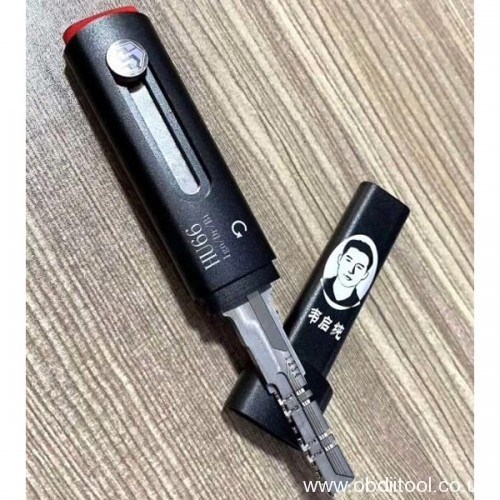
KwikDecoder HU66 vs. Lishi Hu66

KwikDecoder HU66 and Lishi HU66 lock pick and decoder are very hot sale locksmiths’ tool, Here has some reviews of them, aiming to help you decide which one you prefer.

First is Kwik Decoder HU66 Lock Pick 2-in1 feedback

Feedback 1:

I have used a lot the turbodecoders before and for me is easy to use this Kwik Decoder HU66 tool.

Feedback 2: 

simpler to useI have received today. Have tested in a golf V and works good.

Feedback 3:

I tried in a 2015 vw Jetta didn’t work, 2012 vw passat it works and successfully read and make a key akl.

Feedback 4:

For Ford tibbe souber tibbe keys, never failed me door or ignition best investment.

Feedback 5:

Audi A4(B6) 2004- ok
Passat B7 2012 – ok

kwikdecoder-hu66-lock-pick-and-decoder-01

Image source: http://www.obdiitool.co.uk/wholesale/kwik-hu66-decoder.html

Second is Lishi HU66 2-in-1 Lock Pick and Decoder feedback

Feedback 1:

With regards hu66 , I have Lishi , not only does it open hu66 in under a minute but it also decodes as well in another minute and is very cheap (€27.99).

Feedback 2:

I prefer always Lishi Hu66 pick and decode. It will need more skill to do but that the way I can learn.

Feedback 3:

HU66 is quick with Lishi and decode is accurate.

Feedback 4:

Lishi is far too low priced these days , but still very fast and accurate and does require some skill and knowledge despite being easy to use

lish-hu66-02

To be continued…

Source:http://blog.obdiitool.co.uk/kwikdecoder-hu66-lishi-hu66-which-one-you-prefer/

How to use CGDI BMW to Read N13/N20/N55 ISN without Dismantling DME?

There are two ways to read N13/N20/N55 ISN by CGDI prog BMW no need opening the DME shell.

Method 1: Use professional wiring harness

Method 2: Update CGDI prog BMW authorization

In detail…

Method 1: Use professional wiring harness

In order to test directly, here use the DME removed from BMW car. It’s very easy to use, only need to unplug the port from the car and connect the harness with DME.

The wiring harness cannot be mixed, only used in the corresponding model of DME.

cgdi-prog-bmw-n13-n20-n55-isn-1

Procedure:

Plug the wiring harness to the corresponding DME type

Then connect to CGDI BMW key programmer via OBD

Power on and keep the voltage stable (about 12V)

cgdi-prog-bmw-n13-n20-n55-isn-2

Open CGDI BMW software

cgdi-prog-bmw-n13-n20-n55-isn-3

Read/ Write N20 DME ISN- OK

cgdi-prog-bmw-n13-n20-n55-isn-4
cgdi-prog-bmw-n13-n20-n55-isn-5

Read/ Write N13 DME ISN- OK

cgdi-prog-bmw-n13-n20-n55-isn-6
cgdi-prog-bmw-n13-n20-n55-isn-7

Read/ Write N55 DME ISN- OK

cgdi-prog-bmw-n13-n20-n55-isn-8
cgdi-prog-bmw-n13-n20-n55-isn-9

Method 2: Update CGDI prog BMW authorization

If you don’t have the professional wiring cable, please get the authorization, which is easier to use. Only need 61.99 euro for updating authorization and send your CGDI BMW device serial number to distributor once paid, then you can enjoy the newest CGDI prog BMW MSV80 key programmer feature below:

A0000015   B48 B58 read ISN

A0000017   MSD80 / 81 /85 /87 MSV90 read ISN

A0000018   N13 / N20 / N55 /B38 read ISN

All the DME types above no need to open the shell when read ISN.

cgdi-prog-bmw-n13-n20-n55-isn-10

Available link to go: http://www.obdiitool.co.uk/wholesale/cgdi-bmw-read-isn-license.html

Hope it helps you!

Source:http://blog.obdiitool.co.uk/cgdi-bmw-read-n13-n20-n55-isn-without-dismantling-dme/

How to Update Xtool X100 Pad

XTOOL X-100 PAD is a professional key programmer which is good at key programming, mileage adjustment, oil service light reset etc. This article is available with the user manual including:

X100- PAD how to activate

X100- PAD how to set language

X100- PAD how to register

X100- PAD how to update

X100- PAD Customer Reviews

In detail…

X100- PAD how to activate:

Step 1: Activate X-100 PAD key programmer before you use it to test vehicles

Step 2: Input activation code, product serial number (each device will have a serial number and activation code), nickname (workshop’s name or user’s nickname), login account (can be your email address or cell phone number) and password, and then the system will save it.

Activation is a one- time process. The diagnostic application will start after activation.

xtool-x100-pad-user-manual-1

X100- PAD how to set language:

Step 1: Select “SETTING”-> “LANGUAGE”

Step 2: Tick the required option from the multi-language options on the right

xtool-x100-pad-user-manual-2

X100- PAD how to connect Bluetooth:

Step 1: Enter X-100 PAD APP main menu

Select “SETTING”-> “BLUETOOTH”

Step 2: Find and pair the VCI serial number with the mainframe

Note: If it needs input the pairing password, you can input the last five numbers of the serial number. (e.g: 00005).

xtool-x100-pad-user-manual-3

Step 3: Select the VCI serial number and X100 PAD will pair with it automatically when running X-100 PAD APP.

xtool-x100-pad-user-manual-4

X100- PAD how to update:

X-100 PAD updates directly via the Internet using WiFi or wired connection.

Step 1: Enter the update application

Step 2: Open the X-100 PAD application and click “UPDATE”, shown below:

xtool-x100-pad-user-manual-5

Xtool X100 PAD Customer Reviews:

Review 1: So far so good!

Awesome product works great haven’t had a problem yet. The case is sturdy very well built tool. So far does everything the maxisys does and use friendly as well.

Review 2: Excellent for key fob and ignition programming new keys…

A friend of mine bought this x-100 pad device,
I needed to program a key fob on my car, he programmed it with ease and without issue, i was impressed, so i also bought it as i am a car enthusiast, i have programmed a few keys and fobs to various cars, works awesome, plus many other features…. it has paid for itself already with the few projects i have done….

Review 3: Amazing product definitely worth the money

X100 pad works flawlessly could use a few improvements like on Chrysler’s, if it would use by type of rfh then it would do all instead of a few, it can’t really pull a pin code on a Chrysler dart but that’s not too much of a big deal, you can get the code from a dealer, but when it comes to Nissan, it pulls the code so easy and it gives the code to you without having to convert it. I love that feature I used it on a Chevy impala for lost keys, and it programmed it well. I messed up by not putting a jump box on, and the vehicle died, but it did program the keys before it died.

xtool-x100-pad-user-manual-6
xtool-x100-pad-user-manual-7

XTOOL X100 PAD car key programmer:

http://www.obdiitool.co.uk/wholesale/new-xtool-x100-pad-key-programmer.html

http://blog.obdiitool.co.uk

(Solved) Ktag V7.020 Car Protocols Gray Buttons

Offer working solution to Ktag 7.020 error “ any car protocols its gray buttons”, can’t select or choose any cars . ktag v7.020 does communicate between laptop and ktag device and can select cars/trucks/….etc

ktag-car-gray-button-01

It does have power.

ktag-car-gray-button-02

Possible reason and solution:

  1. connect 12v adapter.
  1. The problem is in the SD CARD that is in the interface. I had the same problem and solved it. Programming the sd card for KTAG and KESS is a very difficult process that cannot be done by everyone. There are two options 1. that somebody who knows, do – can program a new sd card or other option to buy SD CARD.
ktag-car-gray-button-03
  1. or the problem is with nxp.

Here is NXP chip sold in China.

ktag-car-gray-button-04

Last but not least, ensure you have one good quality of Ktag clone. i.e SE135-B1 (73.39euro, red pcb), SE135-E (63.22euro, red pcb).

Source:http://blog.obdiitool.co.uk/ktag-v7-020-car-protocols-gray-buttons-solution/

CGDI Prog MB Program Mercedes-Benz W207 All Keys Lost

Purpose: To program a new key for Benz W207 (AKL) by CGDI prog MB.

Preparation:

EIS: Mercedes-Benz W207

Car key: Original Benz key, blank key

Device: CGDI Prog MB Mercedes-Benz key programmer

cgdi-prog-mb-program-new-key-to-mercedes-benz-w207-all-keys-lost-1

Firstly, check the original key can use or not

The original key cannot unlock the ELV

cgdi-prog-mb-program-new-key-to-mercedes-benz-w207-all-keys-lost-2

Plug the original key into CGDI prog MB

cgdi-prog-mb-program-new-key-to-mercedes-benz-w207-all-keys-lost-3

Read EIS- OK

cgdi-prog-mb-program-new-key-to-mercedes-benz-w207-all-keys-lost-4

Read ELV- OK

cgdi-prog-mb-program-new-key-to-mercedes-benz-w207-all-keys-lost-5

Read key- cannot read

cgdi-prog-mb-program-new-key-to-mercedes-benz-w207-all-keys-lost-6

Use the new key to read key data successfully

cgdi-prog-mb-program-new-key-to-mercedes-benz-w207-all-keys-lost-7
cgdi-prog-mb-program-new-key-to-mercedes-benz-w207-all-keys-lost-8

It indicates that the original key is broken.

Procedure: 

Step 1: Calculate password

Step 2: Save EIS Data

Step 3: Generate Key File

Step 4: Read/write the key

Let’s go one by one.

Step 1: Calculate password 

Connect CGDI MB key programmer to EIS well

Plug the BE key into CGDI MB device

cgdi-prog-mb-program-new-key-to-mercedes-benz-w207-all-keys-lost-9

Click on “Compute Password”->“Copy key without key”-> “Collect Data”

Select “OBD Mode”, and press “OK”

cgdi-prog-mb-program-new-key-to-mercedes-benz-w207-all-keys-lost-10

Follow the prompt to remove the plug on ELV, and connect the OBD yellow line with K line on the ELV (K line is the thinnest cable on the ELV plug)

cgdi-prog-mb-program-new-key-to-mercedes-benz-w207-all-keys-lost-11
cgdi-prog-mb-program-new-key-to-mercedes-benz-w207-all-keys-lost-12

Then insert the simulated key into the EIS within 30 seconds, and click “OK”

cgdi-prog-mb-program-new-key-to-mercedes-benz-w207-all-keys-lost-13
cgdi-prog-mb-program-new-key-to-mercedes-benz-w207-all-keys-lost-14

It will take about 2 minutes to collect

Save the data collected

cgdi-prog-mb-program-new-key-to-mercedes-benz-w207-all-keys-lost-15

Save the file successfully. Please upload the data to calculate password

cgdi-prog-mb-program-new-key-to-mercedes-benz-w207-all-keys-lost-16

Step 2: Save EIS Data

Click on “Upload data”

Select the file just saved to upload

cgdi-prog-mb-program-new-key-to-mercedes-benz-w207-all-keys-lost-17

PASSWORD computing success

Click on “Query result”

Copy the key password to backup

cgdi-prog-mb-program-new-key-to-mercedes-benz-w207-all-keys-lost-18

Go to “EIS”-> “Save EIS Data”

Save the file successfully

cgdi-prog-mb-program-new-key-to-mercedes-benz-w207-all-keys-lost-19

Step 3: Generate Key File

Select “Generate Key File”->“Load EIS File”

Open the EIS data files saved

Remove the mark of key1 and key2

Then click on “Generate Key File”

cgdi-prog-mb-program-new-key-to-mercedes-benz-w207-all-keys-lost-20

The key file was generated successfully

cgdi-prog-mb-program-new-key-to-mercedes-benz-w207-all-keys-lost-21

Step 4: Read/write the key

Take out the original key from CGDI Prog MB

And plug the BE key

Select “Read/write Key”-> “Read key/Chip”

Read success

cgdi-prog-mb-program-new-key-to-mercedes-benz-w207-all-keys-lost-22

Click on “Reset”

Reset success!

cgdi-prog-mb-program-new-key-to-mercedes-benz-w207-all-keys-lost-23

Note: Smart key please choose 41 format, common key and BE key please choose 51 format!

When wiring the original key, please make sure that it is wiped by the CGMB, otherwise the write will fail!

Then click “OK”

cgdi-prog-mb-program-new-key-to-mercedes-benz-w207-all-keys-lost-24

Select one 51 format file to write data

cgdi-prog-mb-program-new-key-to-mercedes-benz-w207-all-keys-lost-25

CGDI MB key programmer write BE key success

cgdi-prog-mb-program-new-key-to-mercedes-benz-w207-all-keys-lost-26

Read the key again

The system shows the BE key is unused

cgdi-prog-mb-program-new-key-to-mercedes-benz-w207-all-keys-lost-27

Insert the BE key into EIS/ELV to learn automatically

It can use normally

cgdi-prog-mb-program-new-key-to-mercedes-benz-w207-all-keys-lost-28
cgdi-prog-mb-program-new-key-to-mercedes-benz-w207-all-keys-lost-29

Click on “Read Key/Chip” to read the key status again

The key is used now

cgdi-prog-mb-program-new-key-to-mercedes-benz-w207-all-keys-lost-30

Select “EIS” to read EIS data

The key3 added has been used

cgdi-prog-mb-program-new-key-to-mercedes-benz-w207-all-keys-lost-31

Result: CGDI MB Benz key programmer add new key to Mercedes-Benz W207 AKL success!

Done!

Source:http://blog.obdiitool.co.uk/cgdi-prog-mb-program-benz-w207-all-keys-lost/

How to solve Honda EasyKeyMaker No Sound when Connection

Problem: 

I just received Easykeymaker Honda, but it doesn’t make any sound when i connect it. No “dee…dee…” nothing. The light turns on but no sound.

My key is a transponder key 2007 accord. I tried the switch. The led is red then turns to green but no sound at all.

Obdiitool.co.uk Solution:

Please start the car first, then connect the car with your easy key maker programmer.If the device still does not sound [dee-dee-dee],press this reset button to switch as below.

easy-key-maker-honda-key-programmer-solution-for-no-sound

Customer Feedback:

Update. Never mind. i open the unit and pressed the reset button. It worked. Programmed my keys. Everything works great. Thank you very much. Amazing product!

Easy Key Maker Honda key programmer source: http://www.obdiitool.co.uk/wholesale/easykey-maker-honda-key-programmer.html

How to use Xhorse Condor XC-Mini Plus

This article is available with cutter/clamp installation and online update instructions on Xhorse Condor XC- Mini Plus key cutting machine.

Installation instruction 

-How to install cutter on Condor XC-Mini ii

-How to uninstall cutter on Condor XC-Mini ii

-How to install clamp on Condor XC-Mini ii

Online update 

-How to update on Xhorse APP

In detail…

Installation instruction

How to install cutter on Condor XC-Mini ii?

xhorse-condor-xc-mini-plus-installation-online-update-1

Step 1: Put the cutter into the mounting hole and make sure the cutter goes to the limit of top

Step 2: Use the cutter tightening wrench to clockwise fix the cutter.

How to uninstall cutter on Condor XC-Mini II?

xhorse-condor-xc-mini-plus-installation-online-update-2

Step 1: Counter-clockwise unscrew the cutter manually

Step 2: Take the cutter off when it is loose

How to install clamp on Condor Mini Plus?

xhorse-condor-xc-mini-plus-installation-online-update-3

Step 1: Loosening the clamp tightening wrench by turning it counter-clockwise to the left

Step 2: Select the correct clamp and slide in the clamp to the clamp holder and push it to the limit of left

Step 3: After the clamp is put in the clamp platform, turn the clamp tightening wrench clockwise for fix it

XC-Mini Plus clamps display

Clamp M1 (Standard fixture)

xhorse-condor-xc-mini-plus-installation-online-update-4

Clamp M2 (Standard fixture)

xhorse-condor-xc-mini-plus-installation-online-update-4

Clamp M3 (Optional Clamp)

xhorse-condor-xc-mini-plus-installation-online-update-6

Clamp M4 (Optional Clamp)

xhorse-condor-xc-mini-plus-installation-online-update-7

Clamp M2 sides selection

xhorse-condor-xc-mini-plus-installation-online-update-8

Clamp M4 instruction

xhorse-condor-xc-mini-plus-installation-online-update-9

Clamp M4 for household keys, mainly support standard single and double sided keys, also for crucifix keys, example as follows:

Sided keys

xhorse-condor-xc-mini-plus-installation-online-update-10

Crucifix keys

xhorse-condor-xc-mini-plus-installation-online-update-11

Online update

There are 3 ways to get “’Upgrade kit” file for firmware update

Method 1: Contact your distributor ask for the software

Method 2: Contact Xhorse technical support skype: Live: condor_keymachine@hotmail.com

Method 3: Scan the QR code to download and install Xhorse APP

xhorse-condor-xc-mini-plus-installation-online-update-12

Step 1: Unzip the “Upgrade kit” file after the file has been downloaded

xhorse-condor-xc-mini-plus-installation-online-update-13

Step 2: Run “Upgrade Kit.exe” and connect the machine with the pc

Do not turn off the machine during update process and also the upgrade kit software will update automatically

xhorse-condor-xc-mini-plus-installation-online-update-14

Step 3: Open the file of ‘Driver’ from those decompressed files

Choose a relatively new driver to install

Please kindly notice:

If the computer still cannot recognize the machine after the installation of the driver, it is advisable to change to another driver.

If all the drivers fail, please contact your distributor or technical support from the manufacturer.

xhorse-condor-xc-mini-plus-installation-online-update-15

Step 4: After the machine is successfully communicated with the computer

Read the serial number, then select the XCMINIPLUS and click to update

Note: Please keep the machine connected to the computer by USB during the update.

xhorse-condor-xc-mini-plus-installation-online-update-16

Xhorse Condor XC-Mini Plus automatic key cutting machine:

http://www.obdiitool.co.uk/wholesale/xhorse-condor-xc-mini-plus-key-cutting-machine.html

That’s all. Hope it helps!

Source:http://blog.obdiitool.co.uk/condor-xc-mini-plus-installation-update-online/

Autel MaxiCOM MK908P Reviews

Autel MaxiCOM MK908P is an evolutionary smart solution for specialized automotive diagnosis. Here have collected some customer feedbacks. Hope can give you some advices.

Review 1: Has wide vehicle coverage

I have ever used MK908P scanner on Ford, Honda and VW etc. and there is nothing wrong, all works as described. It scans the car and knows exactly what you’re working with.  Highly recommend to the people looking for a diagnostic tool with wide vehicle coverage.

Review 2: This diagnostic tool works flawlessly

Absolutely a good scanner. This diagnostic tool works flawlessly. It’s well worth the cost. I run a service department at a new car dealership and it has helped us greatly with used car inventory and customers who bring us other make vehicles

Review 3: the best smart scan in the market now

This is a phenomenon, the best smart scan tool, I love it to bits, the updates are free, easy to download, well done Autel, I can’t believe how easy it is to use….

I highly recommend this to anyone who is a serious Tech …

I used it on a Mercedes W211 E320 …and pulled 37 modules just like that ….unbelievable ! !!!!!

Review 4: a must tool for accurate diagnostics.

I was able to read the codes when my other generic reader couldn’t. It also allowed me to run tests as well as analyze more components where I was able to find what’s wrong with the car. Using just the web for repairs is hit and miss since the break occurred with a different component but showed the same warning lights on the dash. That is why I bought the Autel MK908P scanner to pinpoint the exact problem since the web solutions didn’t work for me.

Autel MaxiCOM MK908P 1
Autel MaxiCOM MK908P 2
Autel MaxiCOM MK908P 3

Review 5: Helps figure out the problems on my VW effectively

Since I don’t even know what’s wrong with my car, I have to waste time and spend money just to know the specific trouble. This excellent MK908P can really save me the hassle and make my VW woes much easier to manage. All I have to do is plug it in and it’ll run a diagnostic and tell me what’s wrong with the engine, based on which I can decide what’s the best thing to do. With the guidance of the instrument, I managed to do the oil reset. Reset service mileage and service intervals so as to the next recording cycle can go on smoothly. The larger touch screen shows me all the diagnostic result at the same page so that I can get an intuitive and clear display. Not only this excellent diagnostic tool saves my money, it’ll also make my life easier.

Autel MaxiCOM MK908P Source: http://www.obdiitool.co.uk/wholesale/autel-maxicom-mk908p-diagnostic-tool.html

Related Posts:

  1. Autel MaxiIM IM608 review on FEM/BDC BMW all keys lost
  2. Autel AP200 vs. Bluedriver vs. FIXD OBD2 Code Scanner
  3. Launch X431 V+ HD-III module VS HD-II module working with X431 V+
  4. Mercedes-Benz Xentry OpenShell XDOS 2019.09 torrent free download